FastLink and Configuration Tool – New Features/Enhancements
Account Selection Screen Optimization
The FastLink 4 account selection experience has been enhanced to reduce user drop-off and improve clarity during the verification flow. Funnel analysis identified friction at the account selection step, and the updates focus on clearer interactivity, stronger selection feedback, and improved configurability through the Configuration Tool.
Account Selection Screen Updates -
- Improved radio button visibility –
Radio buttons on account cards have been increased in size and vertically aligned with account details to improve discoverability and ease of interaction on high-density screens. - Hover and click interaction –
Account cards now display a visible hover state to indicate interactivity. Selecting an account can be performed by clicking anywhere on the card, excluding the account classification dropdown area. - Clear selected state feedback –
Selected account cards display a highlighted border or elevation, a selected label with a slide-in transition, and a revealed account classification dropdown. These indicators clearly distinguish the selected card from unselected cards. - Explicit account selection required –
Currently verified accounts are not pre-selected on page load. Users must explicitly select an account before proceeding, reducing the risk of unintended resubmission.
The removal of default account pre‑selection represents the most significant behavioral change in this update. Users who previously encountered a pre‑selected account on the Account Selection screen may notice this difference. Any existing user‑facing documentation or support guidance related to the verification flow should be reviewed to ensure it reflects the requirement for explicit account selection.
New Configuration Options in the Configuration Tool -
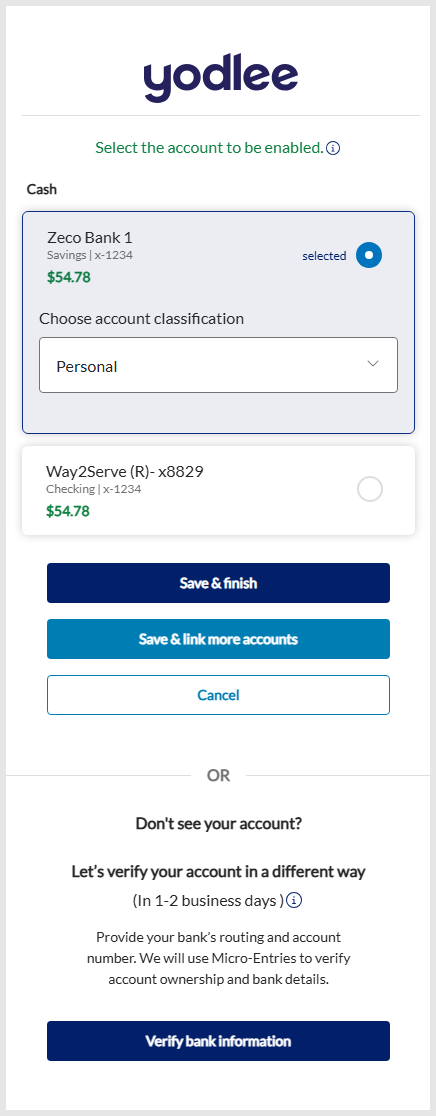
The Configuration Tool now includes additional controls for the FastLink 4 account selection experience. A new Show classification only on selected account toggle is available on the Account Selection → Account classification section. This setting controls whether the account classification dropdown appears on all account cards or only on the selected card. It applies to both single and multi‑account selection modes when classification is enabled and Tile appearance is set to Split by account in Global Settings → Design Preferences section.
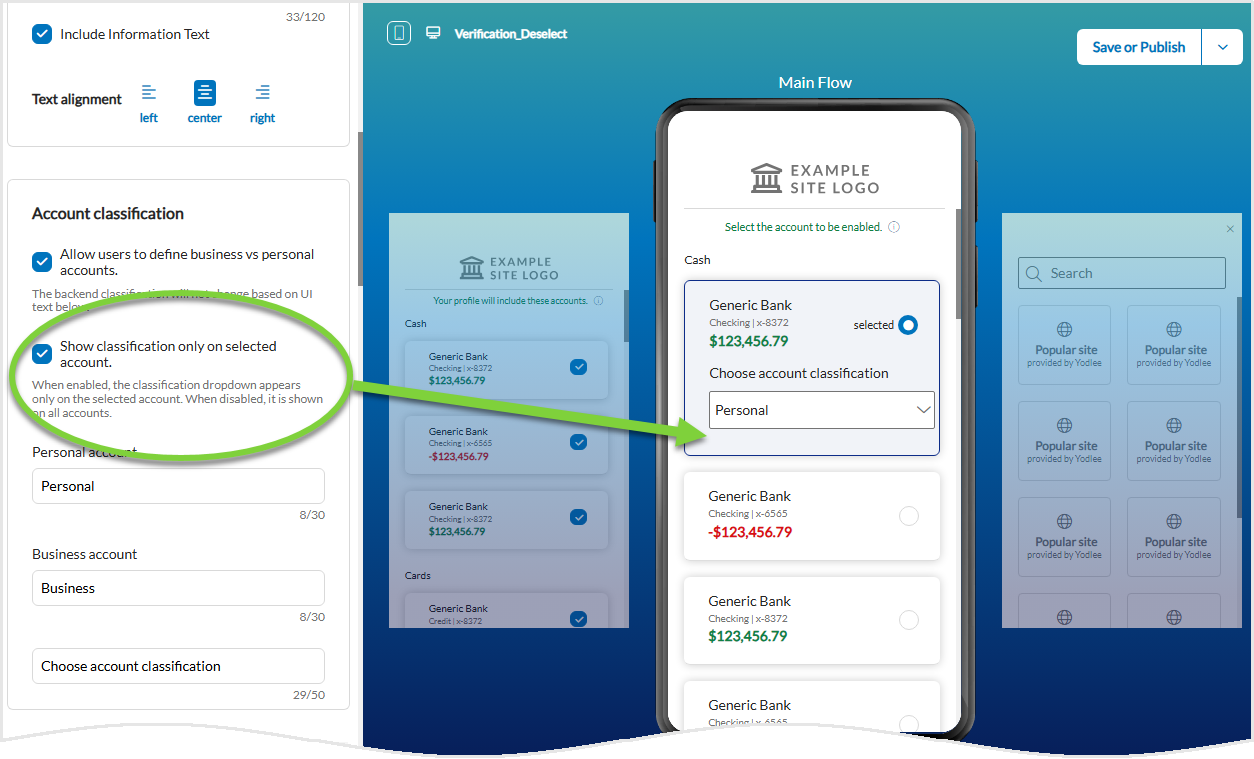
The Account Selection screen also provides options to show or hide the selected label and customize its text. Label visibility and text updates are reflected in the preview. In addition, a color picker is available to configure the border or highlight color of the selected account card.
Recommended Actions Before Publishing -
- Review the explicit account selection required behavior and update user‑facing support materials as needed.
- Access the Configuration Tool to review the new Account Selection settings and confirm they align with the intended experience.
- Update the selected card highlight color if the default does not align with brand guidelines.
Availability -
- Supported only for the standalone Verification product.
- Not applicable to unified flows such as Aggregation + Verification or Verification + Aggregation.
Yodlee APIs – New Features/Enhancements
Authentication and Token API Integration Enhancements
API integration has been simplified by extending the Generate Access Token API (POST /auth/token ) to accept optional user detail fields at the time of token generation. Currently, username data required for name-matching could be registered only through a separate Update User Details API (PUT /user) call after token creation, introducing additional sequencing and error-handling complexity.
The enhanced Generate Access Token endpoint now supports passing supported user details directly in the request body and persists them using the same processing path as Update User Details.
Account Selection Screen Updates -
The following optional fields are accepted in the Generate Access Token request body. The schema mirrors the existing Update User Details API.
user.name.first- First name of the user.user.name.last- Last name of the user.user.name.middle- Middle name of the user.user.name.fullName- Full name of the user.user.phoneNumber- Phone number of the user.user.email- Email address of the user.
Behavior Details -
- New user registration – Provided user detail fields persisted to the user record, with results equivalent to a subsequent Update User Details call.
- Existing user update – Provided fields overwrite previously stored values for those fields.
- Fields omitted in the API call – No changes are applied to existing user data.
- Validation – Invalid field values return validation errors consistent with Update User Details. No new validation rules are introduced.
Backward Compatibility and Scope -
- The Update User Details API remains fully supported with no planned deprecation.
- Fields outside the supported list, such as address, preferences, or configuration attributes, are not accepted in Generate Access Token and continue to require Update User Details.
| Impacted API Endpoint: |
Transaction Data Enrichment – New Features/Enhancements
New Business Category
Business Transaction Enrichment currently supports 31 business categories. A new business category has been added to improve classification of small and medium business data across the platform. The enhancement supports more accurate categorization while preserving existing data access methods and integration behavior.
New business category details follow:
| Category ID | Category Name | Definition |
|---|---|---|
| 32 | Savings | Movement of funds for the purpose of setting aside, accumulating, or reallocating money into savings instruments or accounts, without representing an expense or income. |
Key aspects of the enhancement include:
- The Savings category applies only to transactions created after the release becomes effective.
- Historical transactions are not updated or reclassified.
Impacted API Endpoints –
Sample webhooks payload -
...
   "CONTAINER":"bank",
   "businessCategory":{
      "categoryName":"Savings",
      "categoryId":32
   },
...
For more information, see Business Transaction Enrichment.